What a digital stamp card is
A digital stamp card is a loyalty card added to Apple Wallet or Google Wallet on the customer's phone. They collect a stamp on each visit or purchase and unlock a reward you define once the stamps are complete. There is no app for your shop to install and no long sign-up: the customer scans a QR code once and the card appears next to their bank cards and boarding passes.
The real difference from paper is not the look. It is that every stamp becomes a row you can see: who got it, when, at which branch, from which staff member. From that record you know who has stopped coming and you can remind them on their lock screen without ever asking for their number again. Waya offers three card types, and stamps are the simplest place to start, as stamps or points explains.
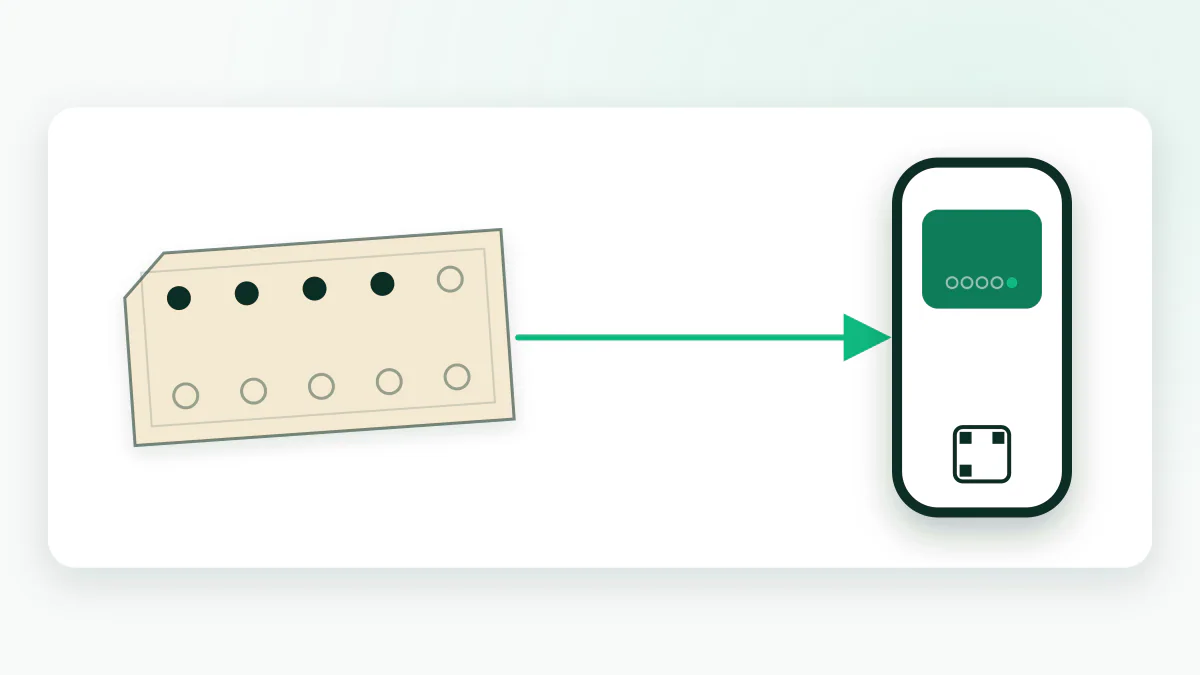
How it works at the till: three steps that don't slow the queue
The first worry of any shop owner is time in front of a customer in a hurry. The whole loop is one scan in each direction, with no special hardware and no connection to your current till.
- The customer scans a QR code and adds the card
A sticker at the till or on the table. They enter a name and mobile number in a short form, the card lands in their wallet within seconds, and a welcome notification follows.
- Staff scan the customer's card on every visit
The customer opens the card from their wallet; your staff scan it from an ordinary phone using the Waya merchant app or the web dashboard. The stamp is added on the spot.
- The reward appears by itself when the stamps are complete
The customer gets a 'reward ready' notification and redeems it on the next visit with a single scan, which starts a new cycle.
What reaches the customer's lock screen
This is where digital clearly beats paper. A paper card sits silent in a wallet; a wallet pass speaks at the right moments: a welcome when it's added, a nudge with each stamp, an announcement when the reward is ready, an automatic reminder after 14 days away, and a location reminder when the customer passes near a branch on Apple Wallet, within a radius of 50 to 500 metres.
All of it arrives as a wallet notification on the lock screen, not by SMS or WhatsApp, so there is no per-message fee. And because a customer can mute any card's notifications in two taps, the rule is to send what helps them rather than what suits you: one meaningful message a week beats five that get muted. The details are in wallet pass notifications explained.
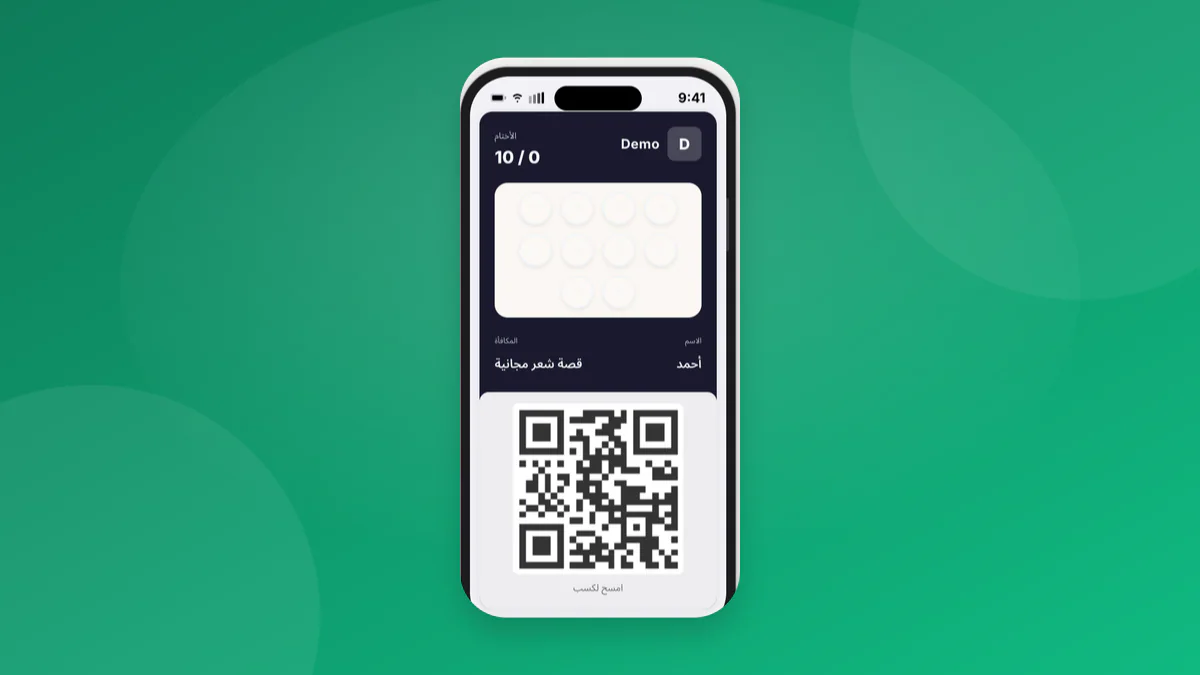
- A welcome the moment the card is added.
- A 'stamp added' nudge on each visit.
- 'Your reward is ready' when the count is complete.
- An automatic win-back after 14 days of absence.
- A location reminder near the branch (Apple Wallet).
How many stamps before the reward?
The right number follows the visit rhythm of your business: something bought daily can carry 8 to 10 stamps, something bought monthly cannot carry more than 5 or 6. The goal is for a regular customer to complete the card within 2 to 3 natural buying cycles, so the reward feels close and the card stays interesting.
The table gives a starting point by business type; the margin math is worked through in choosing a reward threshold.
| Business | Visit rhythm | Suggested stamps | A clear reward |
|---|---|---|---|
| Café | Daily or near-daily | 8 | 9th coffee free |
| Car wash | Weekly | 6 | 7th wash free |
| Barbershop | Every 3 to 4 weeks | 5 | 6th haircut free |
| Bakery | Several times a week | 8 | A free item of the customer's choice |
| Beauty salon | Monthly | 5 | A free service up to a set value |
Designing the card in your shop's colours
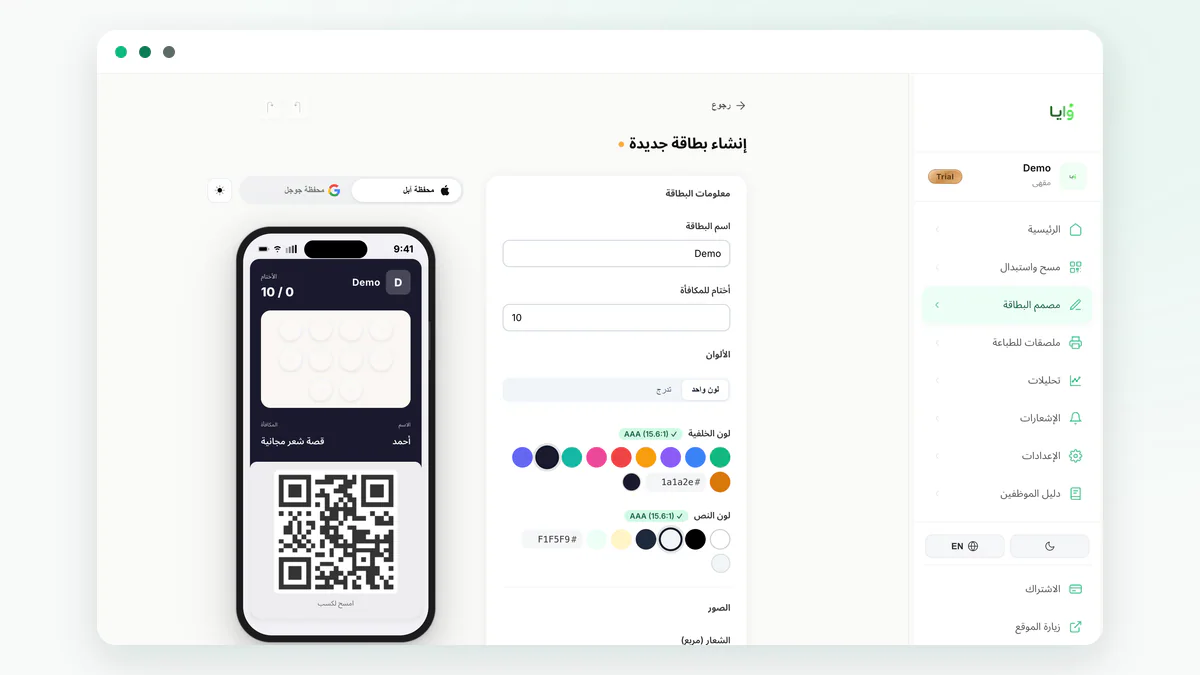
The card sits in the customer's wallet next to cards from banks and airlines, so its design is part of how your shop looks. In the card designer you pick the main colour, the logo, the program name, the stamp count and the reward text, and the phone preview updates with every change. Cards are bilingual and show in Arabic or English depending on the customer's phone language.
Any later change, such as a new reward or a higher stamp count, reaches every card already in customers' wallets with no reprinting and no redistribution. That is exactly what makes experimenting cheap: start at 8 stamps, watch where customers stall, and adjust at no cost.
Launching the card in one week
Most shops on Waya go from deciding to start to their first real stamp within a week. The order below avoids the common mistakes; the full launch list is in the loyalty program guide.
- Define the reward in one sentence both staff and customers understand.
- Design the card in your colours and print a QR sticker for the till and tables.
- Test the full loop on two phones: add, stamp, redeem.
- Train staff on one fixed question for every new customer.
- Retire the paper card after a single transition week.
- Check the return rate in the dashboard every week.
What a digital stamp card costs on Waya
The Free plan is 0 SAR forever with no credit card: one stamp card, one branch, up to 100 customers and 100 wallet messages a month. At 100 customers it stops enrolling new ones and everyone already enrolled keeps their card. Growth is 85 SAR a month for unlimited customers, up to 10 cards, 3 branches, 5 staff and 5,000 messages a month. Premium is 149 SAR a month and adds integrations with Daftra, Qoyod, Loyverse, Zoho Books, Wafeq, Odoo and Rewaa, where a paid invoice adds the stamp automatically.
No commission on sales, no setup fee, no per-customer fee. Waya does not connect to Foodics, Marn or payment terminals, and you don't need it to start. The full plan comparison is on the pricing page.
Free forever up to 100 customers — no credit card required.
Create your stamp card freeFrequently asked questions
Does the customer need to download an app for a stamp card?
No. The card is added to Apple Wallet or Google Wallet straight from the browser after scanning the QR code, and if the phone supports neither, a web card opens instead.
What happens if the customer changes phones or deletes the card?
Nothing is lost. The record lives with you, not on the phone; staff can look the customer up by name or mobile number in the dashboard, or they can re-add the card with the same scan.
Can I stop staff from stamping their friends' cards?
Every stamp is logged with its time, branch and the staff member who added it, so unusual patterns show up in the dashboard the next day instead of staying hidden as they do on paper. On Growth, each staff member has their own login.
Do I need special hardware at the till?
No. Staff scan the customer's card from an ordinary phone with the Waya merchant app on iPhone or from the web dashboard. The Android merchant app is in early access.
Does the same card work across several branches?
Yes. It can be stamped at any branch and visits show in one dashboard with the branch marked. Free covers one branch, Growth up to 3, and Premium has no limit.