Define your best customer in a way your team can review
A VIP campaign starts with an operational definition, not a general feeling that someone is 'important'. Pick one or two criteria you can actually measure — a number of qualifying visits within a fixed period, qualifying spend after returns are excluded, or a mix of frequency and recency. Write the period and the threshold down clearly, then review them on a schedule. Don't let the definition shift every time a customer asks for an exception or a busy season shows up.
Watch out for equating the highest single bill with the best relationship. A customer who visits consistently at a moderate spend may deserve the campaign more than one large purchase. Also don't use sensitive personal information or assumptions about a customer's income — transaction history and program membership are enough to manage a segment you can defend.
Choose a perk that protects your brand's value
A VIP reward doesn't have to be a bigger discount. It can be booking priority if your service allows it, early access to a product, a hand-picked gift, or a message of appreciation at a clear milestone. A good perk has a real cost, a team that can deliver it, and clear limits, and it gives the customer a reason to stay without training them to wait for a markdown every time.
Before you choose the perk, ask: is it fair to other customers, can the branch actually deliver it, and will the cashier know what VIP status means without exposing private information? If the perk depends on limited stock, state the scope and the fallback before you send anything. Don't let the message read like an open invitation to negotiate price at the register.
| Perk | Fits when | Operating rule | Doesn't fit when |
|---|---|---|---|
| Early access | There's a planned launch | A window and a fixed list | Stock is too limited |
| Hand-picked gift | Someone can approve it | A documented reason | Every cashier decides alone |
| Priority service | It can actually be delivered | A stated criterion | It slows other customers |
| Wallet appreciation | There's a real milestone | A message cap | There's no clear benefit |
Write a thank-you message, not a constant sales pitch
A VIP message should explain why the customer arrived at this tier, what the perk is, and when to use it, then leave room for them. Something like: 'You've reached our repeat-customer tier, and you'll have this perk until this date under these terms.' Don't exaggerate with a line like 'you're our most important customer' if it's really a mass message, and don't send it every week or it loses what makes it feel special.
Use Waya wallet notifications when the card is the natural place for the information, such as a perk becoming available or a clear status update. Exclude anyone with an open support issue or someone currently in a win-back campaign — it's jarring to read an automated thank-you while waiting on a balance correction. Also build in a cooling-off period between VIP messages and general promotional messages so the segment doesn't just read as a label for discounts.
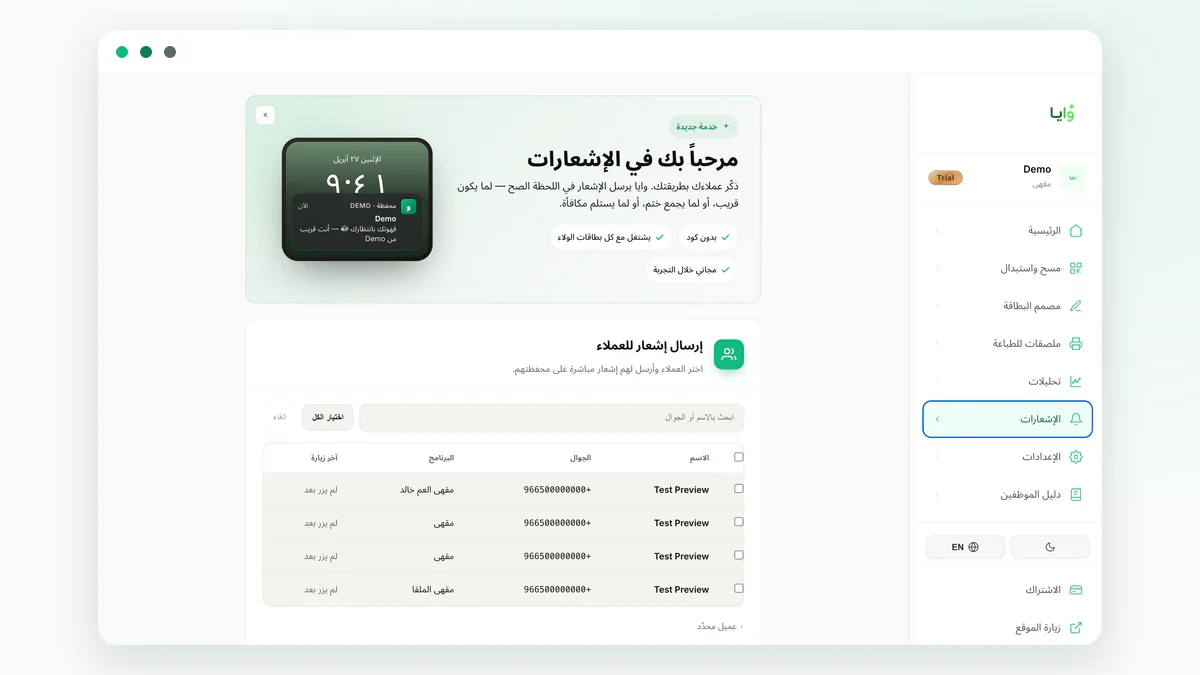
- State a general criterion without revealing the customer's private data.
- Explain the perk and its duration or condition for use.
- Name a branch or scope if the perk isn't available everywhere.
- Exclude anyone with an open complaint or an unresolved adjustment.
- Cap the number of VIP messages sent in a given period.
Tie the special membership to a review decision, not a permanent promise
Decide when a member enters the segment and when their eligibility gets reviewed, without threatening them or using sudden-removal language. You might review it every appropriate operating cycle and keep the perk active until the stated period ends. Don't change someone's status mid-campaign except for a clear data error or a documented policy violation. Transparency protects the team when a customer asks why a certain perk didn't show up.
Keep the core loyalty program's benefits separate from the VIP perk. The customer still earns and redeems under the general rule, while the addition has its own independent policy. This matters for costing and for staff training — no one should use a VIP reward as a substitute for a general reward, or the other way around. Review reward thresholds that protect your margin to write the limit and the fallback clearly.
Organize permissions before you grant any exceptional perk
Decide who can see a customer's status and who's authorized to grant the hand-picked gift or resolve a dispute. Don't rely on a cashier remembering names or on a screenshot a customer sends in. Waya supports staff and branch permissions, which helps split execution between everyday service and review, but you still need a written rule that states when each perk applies.
Train the team on a calm response if the perk doesn't show up: check the card and status, log the question, then escalate if needed, instead of making an on-the-spot promise. If the mistake repeats, pause the campaign temporarily until you understand why. Your best customers notice inconsistency quickly, so operational stability matters more than designing a long list of perks.
Launch the VIP program as a small, learnable cycle
Start with a limited number of qualifying customers and exactly one perk. Watch usage, staff questions, the perk's cost, and whether visits continue within a fixed period. Don't compare them to new customers as proof of impact — a VIP segment was already returning before you launched the campaign. Instead ask whether the perk was used as intended and whether it created friction or exceptions you can't sustain.
Waya gives you a branded card, an analytics dashboard, and points, stamp, or cashback programs, which helps you manage progress without needing a merchant app for the customer. Start on the free plan if it fits, and add tiers only once the policy and the operations are clear. Before expanding, run through the list: a fixed definition, a deliverable perk, a message cap, and documented authority for corrections.
- Set eligibility
Pick a qualifying behavior and period you can extract clearly.
- Adopt a perk
Check the cost, the stock, and the training it needs.
- Send with appreciation
Explain the perk and its limits once, clearly.
- Review the cycle
Check usage and support issues before extending it.
Frequently asked questions
Does VIP mean a permanent discount?
No. It can be an access perk, an appreciation message, or a limited gift, as long as it's deliverable and has a real cost you've accounted for.
How do I choose the eligibility threshold?
Tie it to qualifying behavior over a fixed period, then review it after an operating cycle instead of changing it daily.
Should I tell the customer why they entered the segment?
Mention a general, understandable criterion if needed, without revealing private data or specific transaction details.
What if the perk doesn't show up at the register?
Staff should check the card and status, log it, and escalate per policy — not invent an unapproved substitute.